Your team's operational memory.
Trailogs gives your team one place to record important events, decisions, changes, and updates. Later, explore your history and get answers grounded in what actually happened.
How it works
Capture. Remember. Explore.
A simple progression: record what matters, let it accumulate into history, then ask questions when you need answers.
Capture what happened
Record the events that matter as structured logs — a customer update, a decision, a product change, a sales milestone, an internal update, or a deployment. Each log carries context: category, tags, who was involved, and when it happened.
GlobalShop negotiation — second meeting with CTO and COO
Build your operational history
Logs accumulate into a searchable timeline of what happened across the team. Context that used to live in a Slack thread or someone's memory now persists as a durable record.
- GlobalShop negotiation moved forwardMon
- Enterprise pricing approvedTue
- Checkout v2.4 releasedWed
- Acme Corp renewal confirmedThu
Explore what happened
Ask questions in plain language and get answers grounded in your recorded history — not a generic chatbot guessing at context it never had.
What’s the latest with GlobalShop?
The deal moved forward after a second meeting with their CTO and COO. Next steps include a technical review and final pricing discussion.
Explore
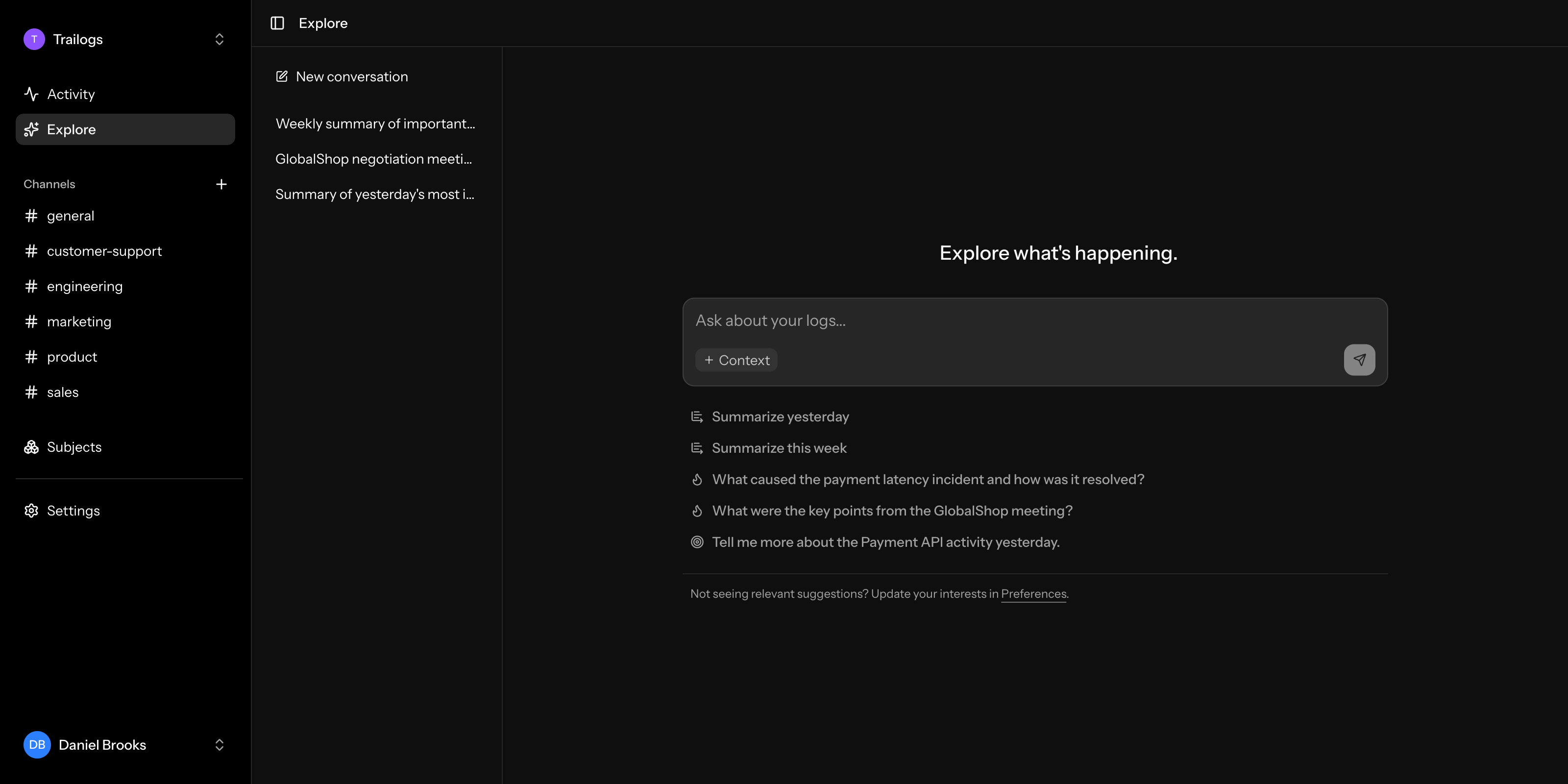
Ask your operational history.
Explore turns your recorded logs into answers. Ask a question in plain language and Trailogs looks through what your team has actually logged — not the open web, not a generic model's guess — to tell you what happened.
- What happened yesterday?
- What changed around the checkout flow this week?
- Were there any customer issues after the latest release?
- What happened with Acme Corp recently?
- Summarize the most important operational events from this week.
How was the GlobalShop SSO concern resolved, and who owns the next steps?
GlobalShop raised concerns about the SSO rollout timeline on Monday. After a follow-up with Product and Engineering, the team agreed on a revised delivery plan, which GlobalShop accepted on Thursday.
Alex Morgan owns the customer follow-up, while Maya Chen is responsible for the technical rollout.
Suggested for you
Trailogs doesn't just wait for a question.
It helps you find the questions worth asking — shaped by what's happening across the team, your role, and the topics you care about. No two people see the same suggestions.
Slack
Right where the conversation already happens.
A lot of operational context starts in Slack. Trailogs meets it there, so people don't have to leave the conversation to ask a question or record what happened.
Ask Trailogs from Slack
Mention Trailogs in any channel or conversation and ask what happened. Answers are drawn from your team's recorded operational history.
@Trailogs what happened with Acme this week?
3 logs this week — a renewal call Monday, a support escalation Wednesday (resolved same day), and a feature request logged Thursday.
Turn conversations into logs
Ask Trailogs to prepare a log from a thread. It drafts a structured entry from the conversation for you to review before it's saved.
@Trailogs create a log from this conversation
Drafted a log from this thread.
API latency spike on payments service
Important context shouldn't disappear into a scrolling channel. Trailogs helps it escape the thread and become part of your team's long-term operational memory.
Integrations
Built to fit into your workflow
Trailogs is designed to connect to the systems your team already uses, not to replace them.
API
Programmatically create and work with Trailogs data.
API documentationIncoming webhooks
Send events from external systems into Trailogs and turn them into operational logs.
Incoming webhooks docsOutgoing webhooks
React to Trailogs events and integrate operational activity with other systems.
Outgoing webhooks docsSlack
Bring Trailogs into the conversations where work already happens.
Slack docsWhy Trailogs
Stop reconstructing the past from scattered messages.
Operational context usually isn't missing — it's just scattered across Slack, tickets, dashboards, and people's memory. The problem shows up later, when someone asks "what actually happened?" and reconstructing the answer takes real time.
Trailogs doesn't replace the tools your team already uses. It sits alongside them as the durable, structured record of what happened — easy to add to, and easy to explore later.
Use Trailogs to keep a record of things like
Early Access
Join Trailogs Early Access
Trailogs is already a working product — you can record events, build your team's history, and explore it together today. It's currently free for a small number of early teams while I work closely with them.
What I'm looking for is honest feedback: how Trailogs fits into your real workflows, what's missing, and what would make it more useful. Early teams can directly influence how the product evolves.
The application lives in the app, so you'll create an account with your email to apply. You can still explore the demo without signing up.
Already have access? Sign in.